Give friends access to the panel
Never share your own password. Add your friends as users with their own login instead.
Add a user
- In the game panel, open Users and click New user.
- Enter their email address. Optional: set an Expiration Date to remove their access automatically.
- Tick only the permissions they need, then click Invite User.
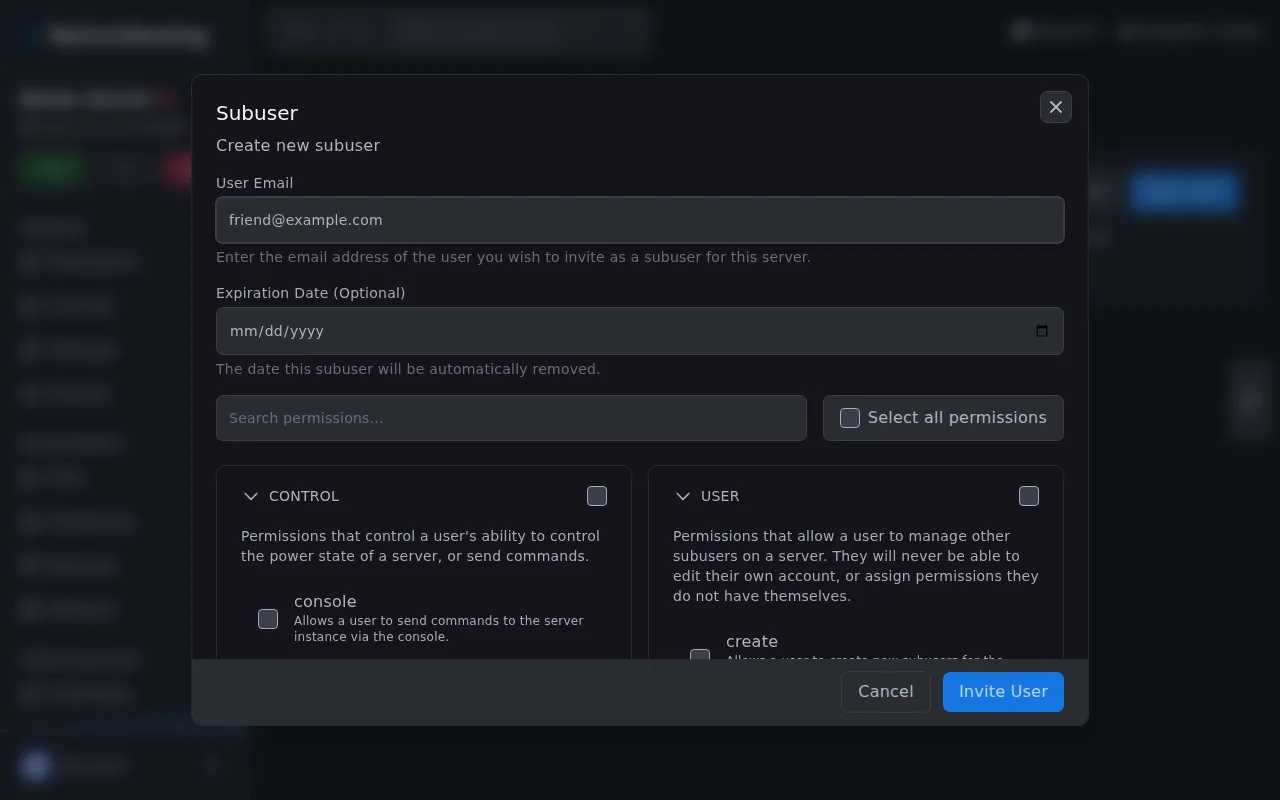
If they don't have a panel account yet, one is created for them. If they don't receive an email, they can use Forgot password on the panel login page with that email address, or open a ticket. They'll see your server when they log in.
Suggested permissions
- Moderator: Control → Console, Start, Restart. Lets them use the console without touching files.
- Builder or developer: add File → read, create, update and SFTP access, so they can manage plugins and configs.
- Co-owner: everything except Users, unless you want them to add others.
To change or remove someone, click the pencil or bin icon next to them in Users. Removing a user takes effect immediately.
Users with file or SFTP access can change or delete anything on your server, including worlds. Keep backups, and only give file access to people you trust.
In-game ranks are separate from panel access. For those, use op or LuckPerms (see Whitelist and ops).
Stuck?
Open a ticket in the client area and tell us what you've tried. We'll point you in the right direction.
Open a ticket